How to photograph crystals so people actually want to buy them
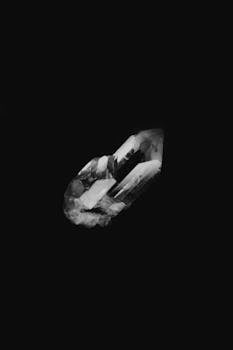
Bad crystal photos cost sellers thousands of dollars a year. Not in equipment they need to buy — in sales they never make. I've seen stunning pieces listed with dark, blurry, yellow-tinted photos that make a $60 amethyst cluster look like it came from a dollar store bin. The stone is the same. The presentation is what changed the buyer's decision.
Crystal photography is harder than most product photography because crystals do inconvenient things: they reflect light in unpredictable ways, they transmit and refract light through transparent sections, and their colors shift dramatically depending on the light source. A rose quartz that looks soft pink in sunlight can look orange under tungsten and almost white under fluorescent.
Here is how to handle all of that without spending hundreds on studio equipment.
Natural light vs. artificial light
Natural window light is the best starting point for 90% of crystal photography. It's free, it's soft, and the color temperature is consistent enough for most purposes. Position your setup near a north-facing window (if you're in the northern hemisphere) or a south-facing one (southern hemisphere) — these give indirect light all day without harsh direct sun.
Direct sunlight creates hard shadows and blown-out highlights on crystal surfaces. If the only window available gets direct sun, tape a sheer white curtain over it or shoot during the hours when the sun isn't hitting it directly.
Artificial light has advantages once you know how to use it. A single softbox (even a cheap $25 one from Amazon) gives you consistent, controllable light regardless of time of day or weather. Two softboxes — one main light at a 45-degree angle and one fill light on the opposite side — eliminate most shadows and give you even illumination across the crystal surface.
Avoid bare bulbs, ring lights pointed directly at the crystal, and your phone's flash. All three create harsh specular highlights that make crystals look flat and washed out.
The background: simpler is better
You do not need a professional light tent. A white poster board from any office supply store works fine as a background. Curve it so it goes from flat on the table to vertical behind the crystal — this gives you a seamless backdrop with no visible horizon line.
Light gray is actually better than pure white for many crystals, especially clear or very pale stones. Pure white backgrounds can cause the camera to underexpose the crystal slightly, making it look darker than it is. A light gray background provides enough contrast for the camera's metering system to work correctly.
For darker crystals like black tourmaline or smoky quartz, pure white or off-white works well. For lighter stones like clear quartz or rose quartz, light gray or a very pale blue-gray gives better results.
Wood, marble, and fabric backgrounds look nice in lifestyle shots but make it harder for buyers to judge the actual color of the stone. Use neutral backgrounds for your main product photos and save the textured backgrounds for secondary lifestyle images.
Phone vs. camera: what actually matters
A modern smartphone is good enough for most crystal photography. The iPhone 13 and later, Samsung Galaxy S21 and later, and Google Pixel 6 and later all have cameras capable of producing sharp, well-exposed crystal photos. The key is knowing which features to use and which to avoid.
Use portrait mode sparingly — it applies artificial blur that can look fake around crystal edges. Use the native camera app in standard photo mode. If your phone supports RAW capture (iPhone Pro models, most Android flagships), turn it on. RAW files preserve more color data and give you more room to correct white balance in editing.
The one area where phones fall short is true macro photography. If you're shooting tiny crystal details — inclusions, surface texture, facet edges — a dedicated camera with a macro lens (or even a clip-on macro lens for your phone) produces noticeably sharper results. You don't need a $2,000 setup. A used macro lens on a basic mirrorless camera body costs $200-400 and will outperform any phone for close-up detail shots.
Stabilize your phone. Even slight hand movement shows up at close distances. Lean your phone against something, use a cheap tripod, or prop it on a stack of books. This single change makes a bigger difference than upgrading your phone.
The three big crystal photography problems
Problem 1: Reflections and glare
Crystals are reflective. Polished surfaces, crystal faces, and even rough textures bounce light in ways that create bright spots and distracting reflections. This is the most common problem in crystal photography.
The quickest fix: change your angle. Move the crystal 10-15 degrees relative to the light source and watch the reflection shift. There is almost always an angle where the reflection lands on a non-critical part of the stone or disappears entirely.
If the reflection is coming from a specific direction (like a window), place a piece of black card stock on the opposite side of the crystal from the light source. The black surface absorbs reflected light and reduces glare on the crystal face nearest to it. This technique is called "negative fill" and it's used in professional product photography all the time.
A circular polarizer filter (CPL) helps significantly with reflections on flat crystal faces. CPLs screw onto a camera lens or can be held in front of a phone camera. Rotate the filter while looking at the screen — at a certain angle, reflections on non-metallic surfaces will visibly diminish. CPLs cost $15-30 and are worth having.
Problem 2: Transparency and translucency
Clear quartz, citrine, and other transparent stones can look like glass lumps if photographed incorrectly. The trick is to show that light passes through the stone, not just bounces off it.
Backlighting works well. Place the crystal on a translucent surface (tracing paper, a thin white acrylic sheet, or even a frosted plastic report cover) and put your light source behind and below it. Light coming through the crystal reveals internal inclusions, color zoning, and the stone's depth in a way that front lighting cannot.
Sidelighting at a low angle (the light source at the same height as or slightly below the crystal) emphasizes internal structure and creates interesting light patterns within transparent stones. This works especially well for fluorite, calcite, and selenite, which have strong internal cleavage planes that catch light at certain angles.
For opaque crystals like malachite, lapis lazuli, or obsidian, you don't need backlighting. Standard front lighting at 30-45 degrees is fine — focus on showing surface texture and color accuracy.
Problem 3: Color accuracy
This is the one that costs you sales. If your photo shows an amethyst as bright purple but the actual stone is a muted lavender, the buyer feels misled when they open the package. Returns go up. Reviews go down. Your reputation takes a hit.
White balance is the single most important setting for color accuracy. Most phone cameras handle this automatically in daylight, but under mixed lighting (window light plus indoor lights), auto white balance gets confused. The result is a color cast — usually yellow or blue — that shifts every color in the image.
Set a manual white balance if your phone or camera allows it. Use a gray card (a small, inexpensive photography reference card) to calibrate: take one photo with the gray card in the frame, then use that as your white balance reference for all photos in that session. If your phone doesn't support manual white balance, edit it in post — most editing apps have a temperature/tint slider that lets you correct color casts.
When in doubt, take one photo of the crystal next to something with a known color — a white piece of paper, a standard color reference, or even your hand. This gives buyers a visual reference point and helps them judge whether the photo is color-accurate.
Post-processing: what to do and what to avoid
Editing crystal photos is not cheating. Every professional product photo you've ever seen has been edited. The key is editing for accuracy, not for fantasy.
Do: adjust white balance to match what you see with your eyes. Crop to remove excess background. Increase brightness slightly if the photo is underexposed. Sharpen very slightly to restore detail that gets lost in compression.
Don't: oversaturate colors. Boosting saturation makes stones look neon-bright in photos and disappointingly dull in person. Don't add artificial glow effects or lens flares. Don't use heavy filters that change the stone's actual color. Don't blur the background so aggressively that the crystal looks like it's floating in a void.
Free editing apps like Snapseed (mobile) or Darktable (desktop) handle 90% of what you need. Lightroom is better if you're willing to pay, but the free options are more than adequate for crystal photography.
Video content: the 2026 advantage
Still photos are necessary, but video sells. A 10-second clip showing the crystal rotating slowly under a light source, or light playing through a transparent stone, conveys more about the piece than five still photos combined.
You don't need fancy equipment. Prop your phone on a stable surface, set it to video mode, and slowly rotate the crystal by hand. The key is smooth, slow movement — fast rotation creates motion blur and looks amateurish. A full 360-degree rotation should take at least 5-6 seconds.
For light play effects (the rainbow refractions that happen when light passes through a clear crystal), use a small LED flashlight or your phone's flashlight directed through the stone from the side or back. Move the light source slowly and let the camera capture the shifting patterns. These clips perform extremely well on social media and give online buyers a much better sense of the stone's optical properties.
Include at least one video clip per listing on Etsy and Shopify. Instagram and TikTok algorithms heavily favor video content, and your product videos double as marketing material with minimal extra effort.
A practical shooting checklist
Before you start a photography session: clean your crystals (microfiber cloth, no chemicals), clean your background surface, charge your phone, and check that your light source is consistent. Shoot in batches — set up once, photograph 10-15 pieces, then edit them all at once. This is roughly 3x faster than setting up for each individual piece.
Take at least 5 photos per crystal from different angles, plus one video clip. Review them on your phone screen (not your camera viewfinder) at actual size — that's how your buyers will see them. If a photo doesn't look good at normal viewing size, retake it.
The whole process gets faster with practice. When I started, it took me 20 minutes per crystal. Now it's closer to 5 minutes per crystal, including a quick edit. The equipment didn't change. The process did.
Comments